
Have an interview coming up?
Here’s how to instantly elevate your sound and appearance (from a former CBS News correspondent).
Laura Podesta
5/4/20263 min read
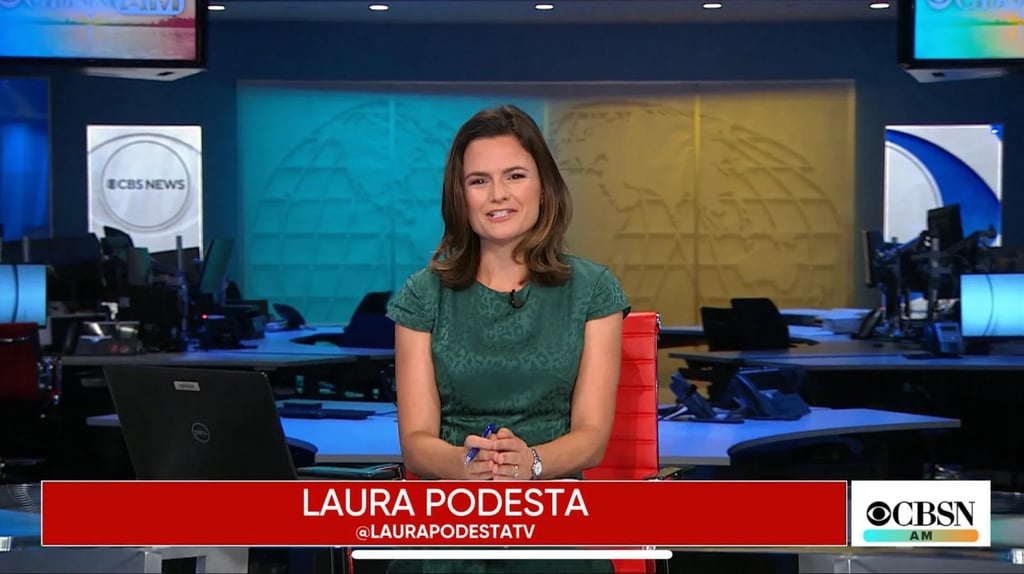
Most people don’t realize how much their setup is quietly working against them on camera.
If the lighting is too dim, the camera angle is wrong or the audio is flat, suddenly, the way the person looks and sounds is undermining what they’re actually saying.
Over the years, between early morning hits as a CBS News correspondent and now coaching executives and founders, I’ve tested just about everything. What products work, what’s a waste of money, and what actually makes a visible difference.
Below is my edited list of simple upgrades that immediately will make you look more polished, more credible, and more in control on screen.
Note: If you purchase through these links, I may earn a commission.
Frame your face.
A very common mistake, and one that instantly makes an interview look less professional, is poor camera height.
You should always be at eye level with your camera. When you see your face on screen, you should have a little headroom (the space between the crown of your head and the top of the screen) and space between your chin and the bottom of the screen, so the frame feels balanced.
If your camera is too low, you end up looking down at it, giving that unflattering double chin effect. Too high, and it starts to feel awkward, like you're looking up at the interviewer.
I recommend with this lightweight, inexpensive laptop stand that allows me to adjust my laptop's camera height no matter where I am seated or what chair I’m using. It’s one of the simplest upgrades with the biggest impact.
Also a good reminder here: avoid conducting interviews while sitting in swivel chairs! They seem harmless, but they make it way too easy to fidget, and that movement reads immediately on camera.
Put your best glow forward.
Lighting is everything. I learned that the hard way waking up at 2AM to report for the 4AM news, I often had under-eye bags :) but the right lighting made them disappear. I’m a big fan of the Logitech “For Creators” clip-on light. It plugs directly into your computer (so no scrambling for an outlet ). It sits right near the laptop camera lens, so it perfectly illuminates your face.
Another plus of this laptop light is you can adjust the color temperature depending on your environment! If you’re near a window, adjust the Logitech light to be cooler. If you’re using lamps as your main light source, go warmer.
Tidy up your background.
Your background should never compete with you. Clean up your bookshelf. Remove clutter. Avoid loud artwork or anything distracting behind you. The goal is to keep the viewers eyes on your eyes, not on anything over your shoulder.
I prefer a real, clean background over artificial ones. I also don't recommend a blurred background, which can feel like the person is hiding/censoring something. If you're a pro with a green screens, this one is portable and a good size for right behind your chair, but a word to the wise, if you're not tech savvy, avoid green screens. Keying them properly can be tricky.
Overall, I recommend just tidying the space behind you.
Powder, always.
On camera shine can show up quickly, especially when nerves kick in, and lighting only amplifies it. A quick brush of a simple translucent powder like E.L.F.'s 'perfect finish' HD powder will keep your skin matte without any residue. (So it's great for guys and gals.)
Face powder is a small detail, but it makes a noticeable difference in how polished you look on screen. All the TV news reporters use it before liveshots, and you'll likely find this kind of powder tucked under every anchor desk as well for touchups during commercial breaks.
Hair out of the face!
I sound like my a parent here. Which I am! But truly, stray hair is distracting. This is why so many news reporters have hair on the shorter side - it's just easier to manage.
So whether you’re in-studio or on Zoom, you want your hair set so it stays out of your face. I still use the same strong-hold hairspray I relied on reporting in the field. You don’t want to be adjusting your hair mid-answer. It breaks focus and pulls attention away from what you’re saying.
Audio matters more than video
I've found that audiences will forgive imperfect video. They will not forgive bad audio. I love my Mac's built-in mic so I don't recommend any mics for computer plug-in. However, if you’re recording on your phone or doing a vodcast, a simple wireless lavalier mic for your iPhone or Android can make a massive difference. Clear audio instantly elevates the look and feel of the video.
Final thought
Most people think being “good on camera” is just about personality. It’s truly about preparation.
I work with clients on preparing the words and message they'll be saying on camera, but we also spend a lot of time on the small, intentional choices that remove distractions so your message actually lands!
I'd love to know if these tools worked for you or if there are any others you'd recommend. Write me at laura@laurapodesta.com.
Join the mailing list for public speaking tips, exclusive offers, and updates.
© 2025. All rights reserved.